Blueduino Quick Text (MOD)
How to install APK / APKS / OBB file on Android
Prefer apk.dog on GoogleHi, There you can download APK games file "Blueduino Hotkeys" for Android free, apk file version is 3.5.1 to download to your android device just click this button. It's easy and warranty. We provide only original apk files. If any of materials on this site violates your rights
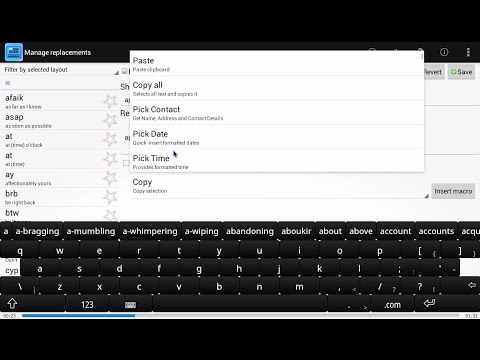
The Blueduino text expander is an app that provides immediate text expansion features with macros, multiline text and emoji.
For Android Lollipop and later it can be configured as an accessibility service so to help expand frequently used texts without the need of changing the system keyboard. The app really saves time with shortcuts for texts that are used often.
The intuitive non-obtrusive interface lets you define your own automatic text replacements such as mail footers, greetings and other common or repetitive texting easily. They are readily accessible from the keyboard or the snippet to clipboard functionality.
It also makes working with your bluetooth keyboard more efficient and helps you to create texts simpler and faster. With this app and a bluetooth keyboard you can write texts fast and define your own abbreviations and text substitutions.
14 days trial version, all licensees of version 2.x will have get the upcoming 3.x series license and can update free of charge.
Blueduino Quick Text lets you:
• define text substitutions such as 'ty' to expand text to 'thank you' and have your mail adress at hand everywhere
• soft keys that have integrated shortcuts and text prediction features
• date and time picker, quickly access as formatted text snippets
• macro functionality, combine shortcuts and interactive pickers
• switch between keyboard layouts for different languages easily
• supports external keyboards e.g. with bluetooth or usb connection including the shortcuts
• create texts faster: simply type predefined abbreviations like "twim" and you'll get " To whom it may concern" immediately.
Besides predefined shortcuts you can also edit your own and make your personal list of abbreviations to create texts more efficiently the way you need them. When typing an abbreviation, a non-disruptive dialog appears in the corner showing either one or more alternatives you can select from.
The Blueduino Hotkeys App saves you lots of typing and time and allows you to do your daily work faster and more efficient with your Android tablet or phone device.
Save time and configure text snippets that are expanded automatically for
• Email signatures
• Long words that are misspelled or easily typed wrong
• Addresses or directions
• Commonly used phrases and text snippets
• Text templates
• Switch between template collections when working with two or more languages
• Improved the keyboard appearence to be compatible with new Android versions
• Proposal list sometimes disappeared
• Share URLs from the browserbar to Twitter / Google Bookmark / Delicious / StumbleUpon / Reddit and Facebook
• Favorites can now also be selected when the app is used as an accessibility service
• Improved word prediction matching your input
• Additional syllable proposal while typing a word
- LicenseFree
- File nameBlueduino Hotkeys
- File Version3.5.1
- Package namecom.weebmeister.blueduino.demo
- CategoryProductivity
- DeveloperUC Mobile Apps
- Developer site
- Developer emailweebmeister@googlemail.com
- Size9.3 MB
- UploadedApril 7, 2018
- Android4.0.3 or later
- md5 hash43ba69cbf93177a7421265dc24ab51e2
- Architecturearmeabi-v7a armeabi
- Permissions11 show
- Blueduino Hotkeys 3.5.1uploaded: Apr 07 2018 size: 9.3 MBAndroid 4.0.3+, armeabi-v7a armeabi
- Blueduino Hotkeys 3.5uploaded: Oct 16 2017 size: 9.61 MBAndroid 4.0.3+, arm64-v8a armeabi-v7a armeabi
- Blueduino Softkeys 3.4.5uploaded: Jul 09 2017 size: 9.23 MBAndroid 4.0.3+, armeabi-v7a armeabi
- Blueduino Softkeys 3.4.4uploaded: Jul 02 2017 size: 9.23 MBAndroid 4.0.3+, armeabi-v7a armeabi
- Freenotes - Notes Taking & PDFversion: 3.31.0updated: Nov 27 2026rating: ★8/10
- Floatee - Floating All In Oneversion: 4.3updated: Nov 27 2026rating: ★7.9/10
- Google Geminiversion: 1.0.1009090390updated: Nov 23 2026rating: ★9.1/10
 Sociallite -Block Reels&Shortsversion: 3.0.9updated: Nov 26 2026rating: ★9.5/10
- Floating Apps (multitasking)version: 4.29.0updated: Oct 09 2026rating: ★7.7/10
- Microsoft Excelversion: 16.0.20708.20010updated: Nov 25 2026rating: ★9.6/10
- BrainPal: See Your Reel Countversion: 24.0.711updated: Nov 27 2026rating: ★8.9/10
- Heygen AI Video Workflowversion: 2.1.6updated: Mar 21 2026rating: ★7.6/10
- Quillbot: AI Writing Assistantversion: 5.3.0updated: Nov 18 2026rating: ★8.9/10
- Sexy Chatbot X - No Filter AIversion: v1.61updated: Sep 06 2025rating: ★8.8/10
- Wispr Flow: AI Voice-to-Textversion: 2.8.8updated: Nov 21 2026rating: ★9.3/10
- Microsoft Wordversion: 16.0.20708.20010updated: Nov 25 2026rating: ★9.6/10
- PikPak-Safe Cloud, Video Saverversion: 2.6.2updated: Nov 22 2026rating: ★9.1/10
- Lovable: Build Apps With AIversion: 1.2.5updated: Nov 20 2026rating: ★9.4/10
- Poe - Fast AI Chatversion: a3.81.0updated: Nov 25 2026rating: ★8.8/10
- Grokversion: 1.2.60-release.00updated: Nov 26 2026rating: ★9.8/10
- ScrollGuard: Hide Reels Shortsversion: 1.2.99updated: Nov 25 2026rating: ★9.6/10
- NaturalReader - Text to Speechversion: 9.51updated: Nov 02 2026rating: ★8.6/10
- Perplexity - Ask Anythingversion: 2.105.0updated: Nov 18 2026rating: ★9.2/10
- Replit: Vibe Code with AI Fastversion: 2.206.0updated: Oct 21 2026rating: ★8.9/10
- Microwardsversion: 1.1.4updated: Jul 13 2024rating: ★6.2/10
- Beatron - AI Music Makerversion: 34.0updated: Nov 06 2026rating: ★9.1/10
- ClickUp: Tasks, Chat, Docs, AIversion: 7.6.0updated: Nov 26 2026rating: ★8/10
- GitHubversion: 1.285.0updated: Nov 21 2026rating: ★9.6/10
